
What this fork adds
These are this fork's, plus the bench beacon that proves the radio side of them works. Everything else in the menus arrived with ESP32-DIV and was touched only where the pin map or the shared bus forced it, which is a different list. That one is under what's different.
Surveillance
One of nine features this fork added rather than inherited, and the one with the most to say: passive detection of hardware that announces itself to anyone in range. Plate readers and their accessories, body cameras, fixed cameras and doorbells, smart glasses, item trackers, vehicle modules, gunshot sensors, pentest hardware and mesh nodes, 283 signatures over nine tables, each one graded, with a filter for when a car park produces more rows than a street.
It is also half of a pair. Surveillance finds, Hunt locates, and the step between them is the one Pueo cannot do, because there is no position in it to do it with.
How the signatures and the scoring work, and how to find a tracker you did not put there →
Drone Detector


The mark, and the alert in both the states it can be in. The last line is the one to read: the operator’s own position is in the broadcast when it has been received, and the alert says so, and says the opposite when it has not, rather than leaving a gap that reads as “no”.
Broadcast Remote ID is an aircraft saying who and where it is, in the
clear, to anyone in range. ASTM F3411 defines it and the FAA requires it of
most drones flown in the United States, so it is not a protocol that has to
be broken into. It exists to be read, and there are phone apps that read
it. This is the same thing on a device that is not a phone.

It arrives on two radios, which is why it sits in Detect rather than
under WiFi or Bluetooth. On WiFi it rides in beacon frames as vendor element
0xDD under ASD-STAN's OUI FA:0B:BC; on BLE it is service data
0x16 under UUID 0xFFFA. Both carry the same 25-byte messages, and a
pack of up to nine of them.

What a decoded pack says. The UAS ID, a serial number or a registration,
from the Basic ID message. Position, altitude, ground speed, vertical
speed and a timestamp from Location. And, from the System message, where
the operator is, which is the field that makes this different from watching
an aircraft: the pilot's own position is in the broadcast.

Every scale factor is somebody else's arithmetic rather than this fork's
reading of the prose. Latitude and longitude are integers divided by 10^7,
altitude is a half-metre step offset by 1000, speed has two multipliers with
a changeover at 63.75 m/s, vertical speed is half-metre steps and the
timestamp is tenths. They come from opendroneid-core-c, the reference
implementation, and the parser is checked against it rather than against a
reading of the standard. A specification is a thing two people implement
differently.

The parser has no radio in it and no screen. Frames go in, reports come
out, so it can be tested on a host against synthetic packs, which is what
tools/check_droneid.py does. The screen and the promiscuous callback are
separate: the callback copies a candidate element into a four-slot queue and
returns, and the decode happens in the main loop, because a callback that
takes its time drops the next frame.

Rows are keyed on the UAS ID, not the address, because the ID is the thing
that identifies the aircraft and the source address does not. On BLE it is
usually random and rotates. Before a Basic ID message arrives there is no ID
to key on, so the address stands in and the row is adopted by the ID as soon
as one turns up.

An aircraft turning up is worth interrupting for. The first one brings up
the mark above, what is known about it, and two rising notes, then fades
rather than cutting, the same alert Surveillance raises on a dwell, built
from the same parts. It is shown once and gone: a banner that stayed would
be covering the list it is announcing.

It fires when the table goes from empty to occupied and re-arms when the sky
clears, rather than once per aircraft, because a busy sky would otherwise
strobe and the thing worth interrupting somebody for is that there is
anything up there at all.

Height and speed, never distance. Remote ID says where the aircraft is, not
how far away it is, and this device has no position of its own to subtract
from it. And the last line is gated the way the dwell alert gates its Hunt
suggestion: the operator's position is claimed when it has been received and
denied when it has not.

Receive only. Nothing is transmitted, nothing is associated with. That is
the same claim Surveillance makes and it is worth the same thing: the
firmware that would have made it false is a separate image.
Hunt


The mark, the picker, and the gauge. The gauge reads signal strength and its own best-so-far, not a distance. There is no distance in a radio that has not been calibrated against the thing it is hearing.
Hunt is for after Surveillance says yes. Surveillance answers whether
something is in range and the AirTag sniffer answers whether there is an
AirTag; neither helps once the answer is yes and the thing is somewhere in
a car.

Pick a tracker from what has been heard in the last minute, Find My by
Apple's 0x12 Continuity type, which is the broadcast a
separated device makes, plus Tile, SmartTag and Eddystone by service
UUID. Those UUIDs come out of the same table Surveillance uses rather than a
second copy. Locking a row opens a gauge: a needle that swings left to
right with smoothed signal strength, a green tick at the best reading, and
WARMER / COLDER / HOLD in large
type above the numbers.

The needle is signal strength, and the screen never prints a distance.
The mapping from one to the other needs transmit power, antenna
orientation and an unobstructed path, and a hunt has none of the three.
A tracker under a car seat reads weaker than one twice as far away in
open air, and turning round with the board in your hand moves the needle
more than a step does.

What survives all of that is the direction of change. Walk, watch which way it
goes, keep the direction that raises it. That is why the direction is the
biggest thing on the screen, why there is a peak marker, and why the closest
band says ARM'S LENGTH rather than a number.

The lock is on a BLE address, and Find My devices rotate theirs.
A rotation ends the lock: the gauge goes to LOST and the device returns as
a new row. Nothing here can follow it across the change, because that is
what the rotation is for, so the screen says so rather than showing a
needle that has quietly stopped meaning anything. A hunt is minutes' work.

Passive scan, continuous window. Never connects, never asks a device anything.
AP Tracker
The same needle, pointed at a Wi-Fi access point. Hunt walks you to a BLE
tracker; this walks you to a radio that is not advertising itself as
anything, which is most of them.

It parks rather than sweeps, and that is the whole difference. Every other
Wi-Fi feature here hops channels, because a scan has to look everywhere. A
scan sweep also samples one access point about once every 1.7 seconds, and
transmits a probe request to do it. AP Tracker picks one AP, sits on its
channel and listens: beacons arrive roughly ten times a second, so the needle
moves when you do rather than a second and a half later, and nothing is sent
at all.

It matches on the BSSID, not the transmitter. For an ordinary beacon those
are the same address. For a mesh or a repeater backhaul they are not, and the
frame carrying the network you locked can come from a different radio. The
one you picked is the one in address 3, so that is the one it follows.

Three seconds of silence marks it lost, which is thirty missed beacons: well
past a couple swallowed by interference, and well short of making somebody
wait to find out the thing has gone. Up to 24 access points in the picker,
sorted by signal.

2.4 GHz only. The ESP32 has no 5 GHz radio, so a 5 GHz-only access point
does not appear in the picker and cannot be tracked. If something is missing
from the list that you can see on a phone, that is the likely reason.
Fast Pair, and a CVE-2025-36911 probe
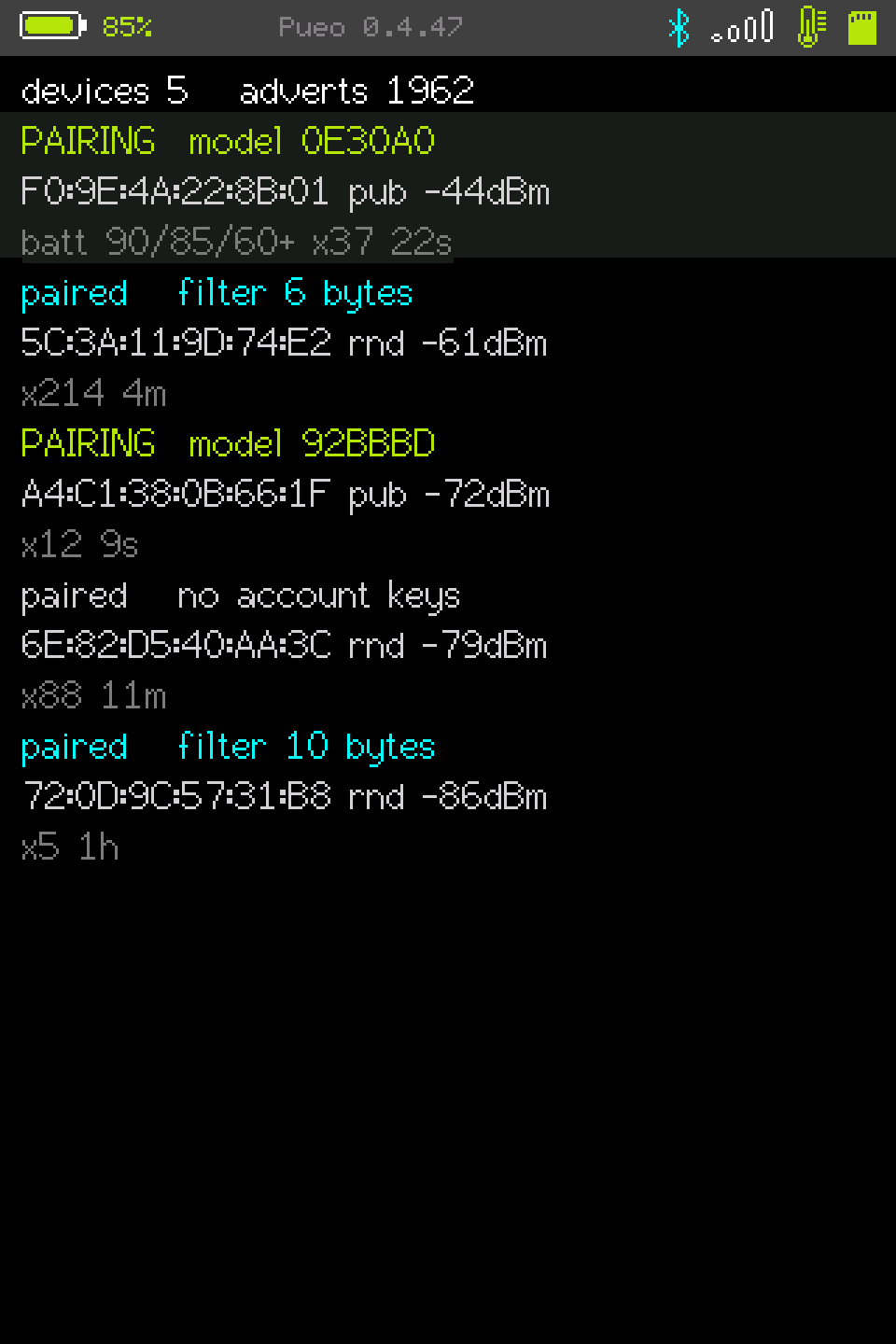
Google's side of the BLE world, which this device had never looked at. The
Apple side was covered three times over (Continuity proximity pairing,
nearby action, offline finding), and the only 0xFE2C ever in the tree was a
spoofing template that nothing referenced.

Fast Pair puts its payload in BLE service data, not manufacturer data, which
is why the Apple-shaped parsers here were structurally incapable of seeing
one. They reach for the manufacturer field; a Fast Pair device never fills
it.

The payload has two shapes and they are easy to confuse. Exactly three bytes
is a 24-bit Model ID, and the device is in pairing mode. Any other length is
a not-discoverable frame (flags, an account key filter, optional salt and
battery) with no Model ID anywhere in it. Reading its first three bytes as
one yields a confident, plausible, meaningless number, and since most earbuds
in the air already belong to somebody, that is the common case rather than
the edge case. The failure is silent: nothing about the output looks wrong.

Nothing correlates devices across address rotation, because Fast Pair
deliberately offers nothing to correlate on. A Model ID names a model, not a
unit. Two strangers with the same earbuds advertise the same one. An
account key filter is a salted bloom filter whose salt rotates, which is its
entire purpose: it exists so a passive listener cannot follow the device. So
a device rotating its address becomes a new row in the list. That looks worse
and is correct, and two tests assert those non-properties so that adding
correlation later means deleting a test that says why not.

The model-name table is empty on purpose. Google publishes the mapping but it
needs an API key, so nothing here can check an entry. The Model ID lists
circulating for "fast pair spam" tools are IDs chosen to provoke a popup,
and the product names beside them are frequently wrong, because provoking a
popup does not require the name to be right. An unknown ID prints as six hex
digits, which is true and can be looked up.

The other half transmits, and it is the first thing here that does so at one
named target. It tests a device for CVE-2025-36911, the Fast Pair key-based
pairing flaw.

A Seeker that wants to pair normally fetches the provider's anti-spoofing
public key from Google, does ECDH against it on secp256r1, hashes the shared
coordinate into an AES key, and encrypts a request whose bytes 2–7 are the
provider's own address. The provider decrypts with its anti-spoofing private
key and checks that address. That check is the whole security property: a
seeker without the real key derives a different AES key, so the address field
decrypts to noise, so a correct provider stays silent.

The probe does all of that except hold the anti-spoofing key, because not
holding it is the point. A device that answers did not perform the check.

The result is four-way and the two interesting ones are both hedged on the
screen, not just in the docs. A response is graded three ways, because a
stray notification from an unrelated characteristic looks much like a weak
hit. And no response is not proof of safety. A busy, already-connected or
out-of-range device is also silent. The failure worth fearing is a probe
broken so subtly that every device reports no response, which is
indistinguishable from a room full of correctly-behaving devices; that is why
most of the 50,293 checks on the request builder are spent on where the
address sits and which way round it goes.

It sits behind a confirm screen naming the target address and stating what
will be sent. It never runs on its own, and never against more than the one
selected row. Point it at your own devices, or ones you have permission to
test.
Flipper .sub, in and out
Reading Flipper .sub files. Pueo's own sub-GHz export is a binary blob with a
magic number, which interoperates with nothing. .sub is what the rest of
the sub-GHz world trades in, so reading one is the difference between a
capture that travels and a capture that stops at this device.

RAW files are refused by name, and by three separate signals. They share the
key file's header and carry microsecond timings where the key would be, and
the profile struct holds a value and a bit count with nowhere to put timings.
Half-parsing one produces a profile that looks valid in the list and
transmits nonsense, which is worse than a file that will not open.

Only Princeton claims an rc-switch protocol number, because Princeton is
PT2262/EV1527 and rc-switch protocol 1 is the same thing. CAME, NICE FLO,
Holtek and the rest parse and come back with protocol 0 and their name
intact. Their timings do not line up with an rc-switch number, and a guess
would transmit something subtly wrong while presenting as correct.

Protocol 0 is an absence, not a number, and the device has to keep
saying so, because rc-switch does not: its setProtocol() clamps anything
below 1 up to 1. An unguarded send transmits Princeton timing under another
protocol's name, does nothing, and reports success. The import names the
protocol it cannot send, the browser shows "none" rather than a digit, and
the send refuses before it asks whether a radio is fitted at all, because no
radio would change the answer.

A rolling code is a different answer, not a weaker one. KeeLoq, Somfy,
Star Line, Security+ and the rest carry a counter, so a captured one is good
for nothing: the receiver has moved past it before you can transmit. Every
one is longer than 32 bits, so they used to fail on bit count, and "bit count
out of range" is true and sends somebody looking for a shorter capture. They
are named now and refused as what they are. That changes the sentence, not
the outcome, and nothing in it helps transmit one.

SUBGHZ › IMPORT .SUB lists the files in /pueo/subghz and imports
the selected one: parse, make room, store, so the steps that can fail happen
before anything is written. The name is the filename without its extension,
because a .sub carries no name of its own, and a keyboard between choosing a
file and finding out whether it parses is the wrong way round.

SUBGHZ › EXPORT .SUB is the other direction, and it matters more
than it sounds. A capture otherwise leaves this device only as that binary
blob, and the five EEPROM slots rotate older ones into it as new ones
arrive. TE is omitted rather than invented, because the record has nowhere
to store one and a reader is better off applying its own default than
trusting a guess from here.

Verified end to end on hardware: a file parses, stores against a reported
slot, and reads back as 433.92 MHz, 24 bits, 0x123456, which is what the
parser's own transcription says that sample is. Neither screen touches the
radio, so neither is gated under Stealth Mode and both work with no CC1101
fitted.
Freq Analyser

A fob keyed at 433.92 with the band otherwise near the floor. The red tick is the held peak, which walks back a dB per sweep, so a burst that has already ended is still readable.
Which frequency the remote is actually on. Replay Attack
wants one chosen before it will listen, and a remote on the wrong frequency
is indistinguishable from a remote that is not transmitting. Eighteen
entries in the list means eighteen attempts, every one of them ambiguous.
This parks on each in turn and reads the CC1101's own RSSI.

Peak hold with a slow decay is what makes it usable. A key fob
transmits for perhaps 200 ms, which an instantaneous bar chart has forgotten
by the time you look up from the remote to the screen. The held peak walks
back a dB per sweep instead, so a burst that has already ended is still
readable, and a steady carrier still stands out from one that was.

Receive only: it tunes and reads a register. There is nothing here for
Stealth Mode to refuse, which is why the Jamming Detector beside it is
ungated too. That claim is asserted rather than stated, because the way a
feature gets left off the gated list is by not transmitting on the day
somebody wrote it.
Swift Pair and Flipper Zero
Two more advertisement templates, both built from primary sources rather than
from another tool's byte arrays, and in both cases the primary source said
something the copies do not.

Swift Pair sends sub scenario 0x00, pairing over Bluetooth LE only. The
other two values Microsoft's spec defines describe a dual-mode peripheral,
and one of them also requires a BR/EDR address in the same advertisement.
This device has none, so sending either would advertise a capability that is
not there. Several spam tools send 0x03, which the spec's table does not
define at all. The display name is Pueo-XXXX rather than a real product's:
Windows prints it verbatim, so a neutral name lets whoever is testing tell
their own notification from a stranger's.

Flipper Zero uses service UUID 0x3080 with the hardware colour OR'd into the
low bits. That is not inferred from captures (Flipper's own serial profile
does exactly that), so 0x3081 through 0x3083 are one service on differently
coloured hardware rather than three services.

The checker walks each advertisement the way a receiver does and insists the
walk lands exactly on the end of the packet. That is the check worth having:
a wrong length byte still transmits, still looks right in the log, and is
silently dropped by everything that hears it. Pointed at the three older
fixed templates, which had never been checked, it found them all well formed,
and decoded the Google one as a discoverable Fast Pair frame advertising
model ID 00B727, one fixed model, never varied.
Device Information
An advertisement says what a device is. It never says which build it is
running, and which build is the question underneath whether something has
been patched. GATT service 0x180A, the Device Information Service, exists
to answer exactly that: manufacturer, model, serial number, and the
firmware, hardware and software revision strings, all of them published by
the device about itself for this purpose.

Info in the BLE scanner's detail view connects to the device on screen and
reads them. That is the whole feature, and what it deliberately is not
matters more than what it is, because the difference between a diagnostic
and something else is only ever in the caller.

One device, chosen by whoever is holding it. Nothing scans and nothing sweeps
a list; reaching this means somebody picked a row out of a list and opened
it, and the address is on the screen before the connection starts. It
reads only: no writes, no pairing, no authentication and nothing outside
0x180A, so a device that wants a bond first returns a failed read and that
is the answer. And it is refused under Stealth Mode, checked inside the
read rather than at the button, because a GATT connection transmits and the
gate belongs on the code that keys the radio.

A device that connected but publishes no 0x180A is reported separately from
one that would not accept the connection. Those say different things: one
talked and had nothing to say, the other would not talk. Strings come back
trimmed to 40 characters with non-printables replaced, because the contents
are whatever the device chose to put in them and a rubbish descriptor should
not be able to scribble on the screen.

This is also the shape the KARR question needed and did not get. Asking
whether a module still carries the shared key means trying the key, which is
the exploit, on a handheld that cannot tell whose car it is pointed at.
Reading a version string off a device somebody selected answers the same
question without that being true of it, and it works on anything with a
Device Information Service rather than on one vendor.
File Transfer
Getting a capture off the card without pulling the card. System → File
Transfer raises a WPA2 access point, serves the SD card over HTTP, and shows
three things on screen: a network name, an eight digit password, and a URL.
Join it from a phone, open the page, tap a file. Exit shuts the access point
down.

Not Bluetooth, and not for want of trying. There is no standard BLE profile
for sending a file. What phones actually speak is OBEX over Classic
Bluetooth, which needs Bluedroid, and this firmware is built on NimBLE
because Bluedroid will not fit beside the rest of it. A custom GATT service
would transfer files to an app nobody has written. Every phone already has a
web browser.

Read only. Nothing it serves can be written, renamed or deleted. That is
SD File Manager's job, four rows away in the same menu, and it wants the
panel in your hand rather than a password typed by somebody in the car park.

The password is new every time the screen opens and is stored nowhere, so
there is nothing to change later and nothing to leak. Eight digits because it
gets typed on a phone keyboard by somebody reading it off a 3.5″ panel, and
a character set needing a shift key every third character is a password that
gets retyped three times. Two devices at a time.

It opens on /pueo, where everything this firmware writes now lives. The rest
of the card is still reachable from there.

An access point transmits, so Stealth Mode refuses it like any other
transmitter. A phone will also warn that the network has no internet, which
is correct: there is no internet behind it, and no server either. The files
go from the card to the phone and nowhere else.
Four settings the device did not have
Stealth Mode. Receive only, across the whole device.
Twenty-one features whose job is to transmit refuse to start, name
themselves and say where the switch is; everything that listens keeps
listening.

Two transmit paths are not features and have no menu entry to gate: the Fast
Pair probe, which is a button inside a scan that is otherwise passive, and
the BLE scanner's Info read. Both carry the check inside the function that
would transmit and report the refusal back to their caller, rather than
closing the tool around them. The gate belongs on the code that keys the
radio, so that a second caller cannot forget it, and the checker insists it
comes before the first radio call as well as being present at all: a gate
after the connection is open is not a gate.

The part worth reading is which things were transmitting without looking
like it. A WiFi scan is active unless its third argument says otherwise,
and all eight calls in this firmware left it false, so “scan for
networks” was putting a probe request carrying this device's address on
every channel, the wardriver and the background scanner included. A BLE scan
answers every advertiser it hears unless told not to, and four calls asked
for it. Those are made passive rather than blocked: a tool that listens
should keep listening. The wardriver's WiGLE upload, which joins an access
point, is refused on its own while the log keeps being written.

RFID is one gate for its whole menu. A PN532 reads a card by energising a
13.56 MHz field and waiting for an answer, so read transmits exactly as
much as clone does.

It is not a hardware interlock. The radios stay initialised because every
receiver needs them, and an initialised stack is one call away from
transmitting. The claim is worth the list of gates, which is why the list is
checked rather than trusted: every raw 802.11 transmit in the tree has to
sit in a namespace whose entry point is gated, so a new transmitter added to
an old screen fails the check instead of quietly transmitting.

SD Logging, per feature. A master switch,
Log to SD, and one each for Surveillance,
the Jam Detector, the Packet Monitor, the ESB Sniffer and the Wardriver. A
feature logs when both say yes, and says so in its own words when it cannot,
the capture button reports log off rather than no SD at a card
sitting in the slot.

It does not cover files you ask for by name: a saved .sub, a
DuckyScript, the settings file itself. Those are the point of pressing the
button rather than a side effect of running the app.

JSON format. Log rows as NDJSON, one object per
line, instead of CSV. Off by default: CSV is what every release so far has
written and what anything already parsing these files expects, so it is a
thing you turn on rather than a change that arrives under you.

Surveillance, the ESB sniffer and the jamming detector honour it. Two do not
and will not. The wardriver keeps WiGLE's CSV because WiGLE's upload accepts
nothing else, and the packet monitor keeps PCAP because that is what
Wireshark reads. Neither format is this project's to choose.

One object per line rather than one document per file. A capture is
append-only and can run for hours, so a document would mean holding it all in
memory or hand-writing the brackets, and a card pulled mid-write would leave
a file that parses as nothing at all rather than one short row. The format is
read once when a file opens, so a setting changed mid-capture cannot produce
a file that is half one thing.

SSIDs are escaped properly, which the CSV never did: it substituted dots.
check_log_fields.py holds the two spellings of a row to each
other, since a field added to a header and not to an object is two files
disagreeing about what a row is, and both are string literals as far as the
compiler is concerned.

Boot Lock. A password asked for before the menu appears. Salted SHA-256,
stretched twenty thousand rounds, stored in NVS on the ESP32's own flash and
never on the card: the card comes out, and reads on any laptop.

It stops someone who picks the device up, and nothing else. The firmware
reflashes in twenty seconds and esptool reads the flash out without asking
this code anything; a CYD has no secure boot, no flash encryption and no
fuse burned. It is a thing the running firmware chooses to honour, not
something the hardware enforces, and it is described that way in its own
source as well as here. A lock described as more than it is gets trusted
with more than it can hold.
The bench beacon


The splash at the last second of its countdown, and the counters. 495 beside ALPR probe is what turns “nothing detected” on the other board from a mystery into a measurement.
Every detector on this page is checked against synthetic frames and, where
one exists, a reference implementation. None of that proves a radio
path. A decoder can be perfectly correct while the scan never hands it a
byte, and the symptom is an empty list, which is also what an empty room
looks like. The drone detector shipped in 0.3.9 with no way to tell those
two apart.

PueoBeacon is the other half. It is a second firmware, built with
PUEO_ROLE=beacon and flashed to a second board, and it emits every
signal this firmware looks for: Remote ID over WiFi Beacon and BLE, a
plate-reader probe, a body-camera beacon, smart glasses, a vehicle module, a
Find My tracker, and Fast Pair in both payload shapes.

It is a separate image rather than a menu entry, deliberately. Surveillance
and the drone detector both say they transmit nothing, and that is a claim
about the binary as much as about the feature.

It found four bugs on its first evening. Three flickering list
screens that only flicker when something is actually in range, and a dead
WiFi transmit path in the beacon itself. That last one is the argument for
building it: the detectors were fine, and nothing else would have said so.

The payloads are built to be recognised rather than to be convincing,
PUEO-TEST identifiers, DEAD in the device half of every
address, transmit power at the floor, a five-second countdown before it
starts and a fifteen-minute auto-stop. These signals do not stay on a bench just
because that is where the bench is: Remote ID has public receiver apps, and
a fake plate reader lands in somebody else’s anti-surveillance tool the
same way. The vendor OUIs are real, because an OUI matcher cannot be tested
without the OUI it matches.

The counters are the whole instrument. An empty list on the other board
means either nothing was said or nothing was heard, and those look identical
from where you are standing. The numbers on the right of the second screen
turn that into a measurement: 495 beside ALPR probe is 495
frames that went out, so a detector showing nothing is a detector that did
not hear them.

That is not a hypothetical. Those 495 are the real figure from the evening
the BLE duty cycle was found: Surveillance heard the first of them after
about five minutes, because a BLE scan whose window equals its interval asks
for the single radio continuously and leaves the WiFi side almost nothing.
Without a count of what was sent, that reads as a quiet room.

One BLE row is green at a time, with a chevron beside it. BLE advertising
is a state rather than an event, so only one of the BLE decoys can be live
and the scheduler rotates them. The marker is in the row's text and not
only in its colour, because the painter compares text and would otherwise
leave a row that went live looking exactly as it did before.

The splash counts down rather than waiting. Five seconds is long enough to
read what the board is and pull the power if it is the wrong one, and that
is the only moment before it starts transmitting. It says THIS BOARD
TRANSMITS in the warning colour rather than the owl's, because a detector was
once overwritten with this firmware and nothing on screen, or in the build
output, said which was which.

It is a download, from 0.4.4 on. Every release before that built the detector
only, so the beacon shipped as source and getting one meant the 1 GB
toolchain, which is the same reason the detector's merged image is offered
at all.

  pueo-0.4.47-beacon-35-merged.bin   3.5″ · 1.0 MB
  8cbb2aa3e94cc77afcabd86a12d8dd738bd541ceace918b68a806d1213c61e45

Read the name before you flash it. Everything else offered here is a
receiver; this one transmits, which is why the role is in the filename and
not only the panel. It is 3.5″ only. That is the panel the
second board is, and an unbooted transmitter is a worse thing to publish
than an unbooted receiver, which fails by finding nothing.

None of the restraint in it depends on you reading this first. Every
identifier says PUEO-TEST, every address carries DEAD in
its device half, the power sits at the floor, the splash holds five seconds
under THIS BOARD TRANSMITS in red, and it stops itself after fifteen
minutes. It reproduces from the same archive as the other two.